Your circle · 5 min read
How to share location and heart-rate readings with someone you trust
By Rohan Mehta ·
Rohan Mehta is an editorial pen name used by a HeartRay employee.
HeartRay lets you share a heart-rate reading, your location or a letter with someone in your circle. A good place to start is two people agreeing on what they want to share with each other.
Maybe one of you wants to see the other's location when making plans. Maybe a parent wants to send a quick hello while out and about. Different friends can share different kinds of information. Here's how to arrange that together.
1. Agree on what sharing is for
Before sending an invitation, say what would be useful, then wait for the other person's response. “Let's use location when we're meeting up” is clearer than “Let's keep track of each other.” Ask which information they want to share and receive. Either of you can change your mind later.
Sharing does not have to be symmetrical. One person might share location while the other prefers letters and stamps. A missing update is a reason to ask, not a reason to demand more access.
2. Invite one person and check Who sees what
Open Today in HeartRay and share your one-time invite code. The other person sends a request, and you accept it. HeartRay connects people through invitations rather than a public profile directory.
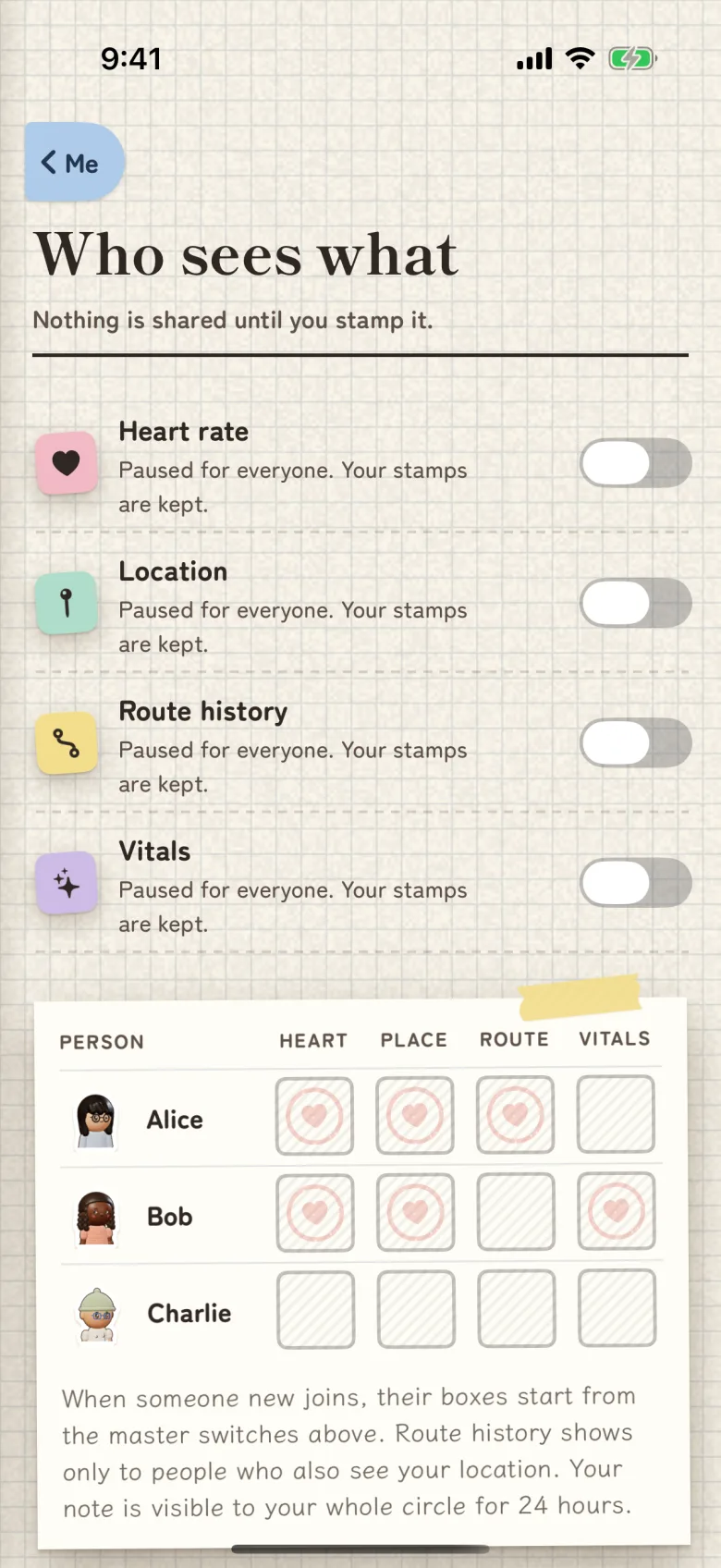
After connecting, open Me, then Who sees what. Review heart rate, location, vitals and route history separately. Look at both the general sharing switches and the settings for that person.
Sharing is off for a new account. If you have already enabled general sharing, a newly accepted friend can inherit those settings. Check the switches before exchanging invitations and again once the person is in your circle.
You can share location while keeping health readings private, or send heart-rate readings without sharing location. Pick the combination that matches your conversation.
3. Give the phone the permissions the feature needs
Phone permissions and friend sharing are separate settings. Allowing HeartRay to read a measurement gives the app access to that source. Who sees what determines which approved friends can receive the information you share.
On iPhone, available health readings come from Apple Health. On Android, they come from Health Connect. You can use HeartRay together across the two phone platforms. A friend does not need a watch to view readings you share.
For location updates on iPhone while HeartRay is closed, the phone's location permission needs to be Always. On Android, background sharing uses a service you start, with an ongoing notification and a Stop sharing action. If you need help with a permission, the HeartRay Support page explains the setup.
4. Read the time beside a reading
A heart-rate number is one measurement from a particular moment. Look at its timestamp before treating it as an update about someone's day.
HeartRay shows the original measurement time. Refreshing an old reading does not make it new. Apple Watch supplies existing measurements while the HeartRay watch interface is active, and Apple controls when a new measurement is taken. A compatible Wear OS watch can share readings during a session the wearer starts and stops.
If an update is older than you expected, ask the person directly. Permissions, available measurements and connectivity all affect what arrives. HeartRay is not a medical device or an emergency service. Use your usual way of contacting someone when you need an answer.
5. Revisit the arrangement
Open Who sees what when your plans change, when your comfort level changes, or just to check the arrangement. Turn off a signal for a particular friend, or use its general switch to stop sharing that signal more broadly. Wait for the app to confirm that your changes have saved. If you have separately started a trip, end that trip too; its sharing is separate from everyday location sharing.
For an ordinary hello, try a stamp or a letter. You can keep in touch without making every conversation about a reading or a map pin.
Start with one invitation, check the switches together, then verify that each person's view matches what you agreed to share.
Setup help
See Who sees what and reading sources, or visit Support for timestamps and permissions.